2 Easy Tips for Keeping Track of Birthdays & Anniversaries
And keeping it simple!
(Initially published on medium.com, 26-July-2024, Photo by Eric Rothermel on Unsplash)
Until the early 2000’s, my wife and I used a bound book calendar formatted with one-week per page to keep track of special dates — mostly birthdays, then friends/family weddings, then their kids’ birthdays. That worked great to have one location to record these dates, especially as we merged our extended family members’ dates after getting married.
But, the hard-copy calendar book wasn’t ideal because (1) if you couldn’t remember the general timing for an event, you had to browse pages to find what you were looking for, if it was recorded in the book, and (2) you could still miss a key date because there was no reminder.
So here are my 2 easy tips to address these two issues:
Oooh! This calls for a spreadsheet!!
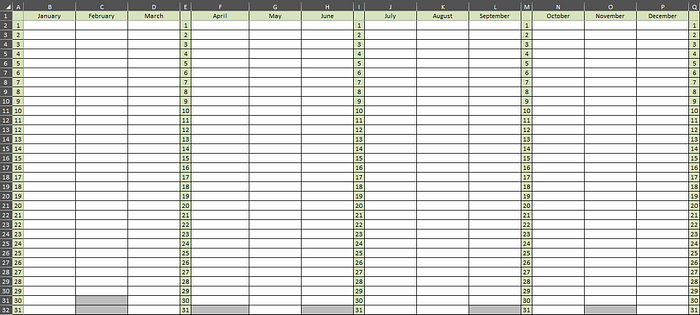
Tip #1: Create a spreadsheet matrix, so you can view the whole year in one glance.
I created the spreadsheet template below and formatted it so it prints on one landscape letter size page when printed. I shaded out the dates in months with less than 31 days and added the day columns every quarter to make it easier to find dates.
Quite simple, but functional. This was my first step to get a better handle on our key dates. By seeing the year in its entirety, it can be really helpful to get a broad overview of things coming in the next month or so to plan for sending cards, gifts, emails, etc.
At the month/day cell, I just put the person’s name or event with year behind it:
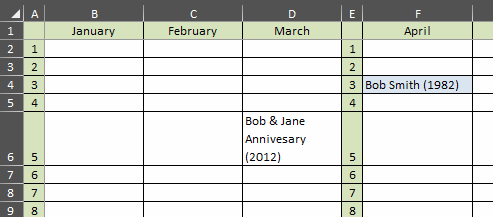
If you are Bob Smith born 03-April-1982, apologies to you. I just made up your name/birthday to have an example. Please don’t expect an email, call or text from me on your birthday.
If you are wondering about the blue shade to Bob’s birthday, keep reading to tip #2.
Tip #2: Load key dates into your calendar program
Load these key dates into your digital calendar with annual recurrence. I happen to use Microsoft Outlook calendar. Most dates in my spreadsheet calendar are loaded into my digital calendar so I get a reminder before the day.
For most entries, I use a 2 day reminder, but some dates get an extended duration (1–2 weeks) if I know I want to send a gift or card and/or the person is out-of-town/state/country.
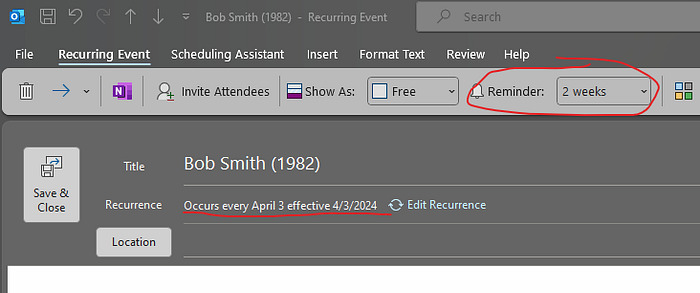
What about the blue shading in the spreadsheet?
For any dates I load into my digital calendar, I shade the cell blue in the spreadsheet to note/remind me that it’s in my digital calendar. Some dates I’d like to just know, but I’m not desperate to have reminder show up in my calendar. This helps me keep straight on which ones are in my Outlook calendar or not. For my calendar, the majority of my spreadsheet dates are shaded blue.
These reminders are a super way to remember to reach out to folks you don’t see often, as well as ensure you don’t forget key dates as life gets busy.
Final thoughts
I recognize folks may say that with today’s technology, using tip #2 digital calendar is the easy, obvious way to keep track of dates because you can search your calendar to find what you’re looking for.
So why do I maintain the spreadsheet calendar and also do the digital calendar?
- I keep the spreadsheet mainly for the convenience of a one-page full year view. I find it very helpful to have an overview of what’s coming up.
- I don’t need to browse or perform multiple searches in my digital calendar to find dates of interest, especially when looking ahead for the next month or whenever. (I can still do a search on my spreadsheet if I’m feeling lazy.)
- The new birthdays & anniversaries don’t come up that often, so it’s easy to maintain both.
- It’s great to be able to print and share with my wife and kids to make sure we have all the key dates noted. I recognize we could do a shared digital family calendar, but this way works for me without hassles of synchronizing issues (see below) and the shared digital calendar doesn’t help with #2 above.
- My spreadsheet is independent of whatever email/calendar/contact services I am using. I don’t know about you, but I have had cloud-based services get corrupted before. The spreadsheet is separate from any cloud-based synchronizing activities, giving me a back-up of the data.
- For me, it’s simple and functional.
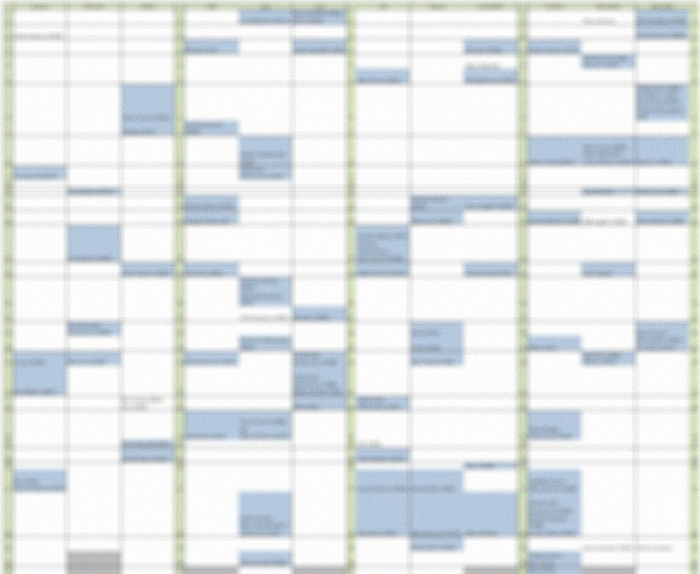
Here’s a sample of mine, blurred for privacy.
Enjoy Life & Thank you for reading,
-Jeff
Bonus for you:
If you want a copy of the Microsoft Excel template, I created the blank template and it’s available on Gumroad. Click here to go directly to the listing. It’s inexpensive and ready to use!