My To-Do Lists, My Lists of Lists & Non-Bucket List
The good, the bad, and the ugly of list making.
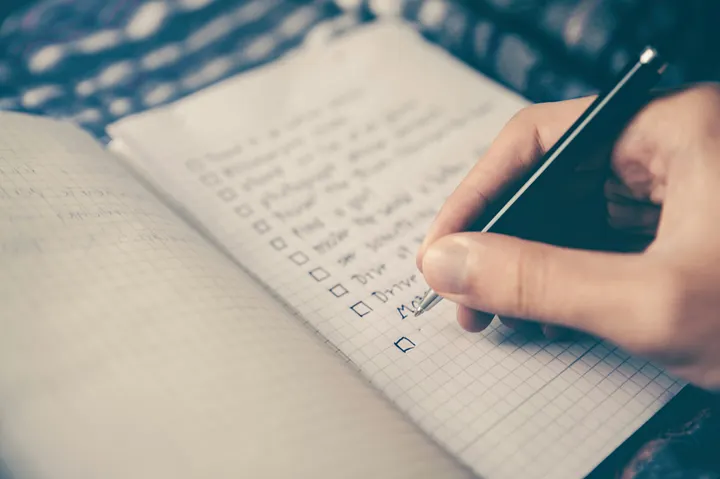
(originally published on Medium.com, 02-Oct-2024, Photo by Glenn Carstens-Peters on Unsplash)
Please, don’t laugh. I know it sounds slightly crazy or OCD. Perhaps both, I don’t know, but I have lists of lists for all sorts of to-do items.
Why do I make lists?
I find that my brain bounces all over the place. Constantly. It can go into hyper-drive with ideas. With that comes thoughts of things to do regarding those ideas; hence I make notes and lists.
I haven’t been formally diagnosed with anxiety or ADHD, but doing some ‘internet web search doctoring’, I think it’s safe to say I have some varying degree of both.
For me, lists are awesome as they let me make a note of something to come back to later (hopefully!) without the worry of potentially forgetting it. If I think of something important, I can rehash it in my mind too much as I think ‘I must remember this.’
Just knowing the ideas and thoughts are on the list gives me a freedom to stop thinking (and overthinking) about these things. I can always come back later to review the list and confirm the need for the task and determine its priority and timing to start and complete it.
If it’s truly important, it will bubble up to top soon enough.
Evolution of a List
I started making lists over 30 years ago. My first lists were for daily work tasks and plans for the weekends. These were recorded in my book-bound daily journals, like the ones shown below.
I would write longer term tasks at the beginning or end of the book so the list was easily found.
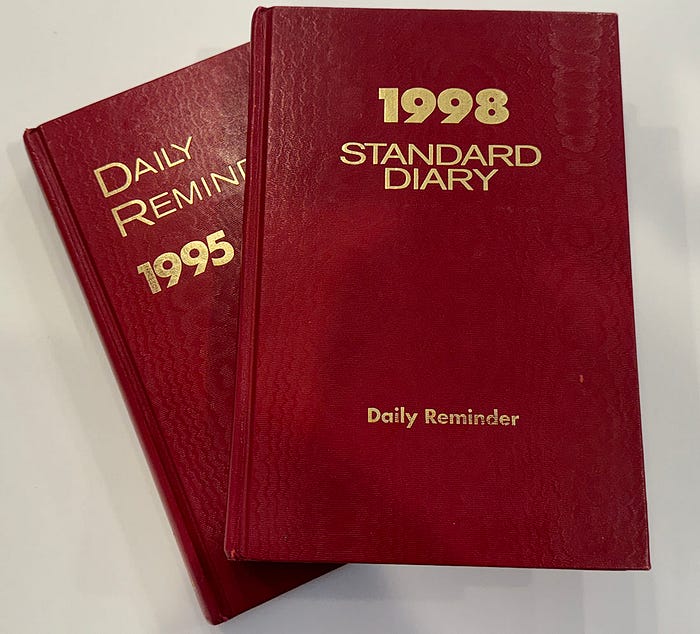
At one point, I had a book shelf of these journals lined up from 1993 to 2002, or so. I got rid of all but two of them:
- The 1995 journal has the date and notes when I met my future wife.
- The 1998 journal has the date and notes of our wedding.
Those were the same journals I used for my initial food log recording if you read that article.
Eventually, the hand written lists at the front and back kept getting transferred as necessary to the next year’s journal. It was time for a change.
And, the upgrade from journal book…
Welcome to Microsoft Excel.
Around the beginning 2000, before an overseas work assignment, I decided to start a spreadsheet (yes, I’m an engineer) task list as I realized I had more to-do tasks than I would finish in a short period and some that would be applicable upon my return to the USA. So was born my spreadsheet task list.
I used different techniques over the years to organize and prioritize my to-do list. At one point, it was over 11 pages long when printed out when showing the complete list (open and closed actions). The great thing with spreadsheets is being able to filter data, so I could filter and print the list based on status, due dates (if assigned), priorities (1 through 5), categories (home, health, finance, vacation, etc.), so I could choose what to work on.
The spreadsheet version worked for quite a while.
And, then came Microsoft OneNote (play an epiphany sound now).
I started using OneNote around September, 2013 (that’s the earliest dated note sheet I found) and I’m still using it today.
Why do I like OneNote?
- OneNote is basically a digital bookshelf of 3-ring binders. You create any number of number of binders (notebooks), their sections, and their pages. And, instead of carrying a number of physical 3-ring binders around, you have them in your digital devices.
- OneNote has app’s for my devices and it synchronizes my files across all my devices (phone, tablet and computer), so all my notes are available wherever I am.
- When I’m out and about, it’s easy to quickly type an idea into a ‘dump’ page on the phone app, so I don’t forget. When I’m back at my desk, I can address it. It’s great to avoid that feeling of “I must remember that for later’. It’s great to have access when you find yourself out shopping and trying to remember an item you had on the grocery list or other shopping list.
- It is simple and easy to use. I’m sure I’m not making use of all the features, but I use what I need to keep it simple and functional.
- It’s searchable for finding topics when you can’t remember where you filed something.
- You can use use it for both work and personal activities given its flexibility.
My List of Lists
It may seem over the top, but here’s my list of lists: (and how I use them).
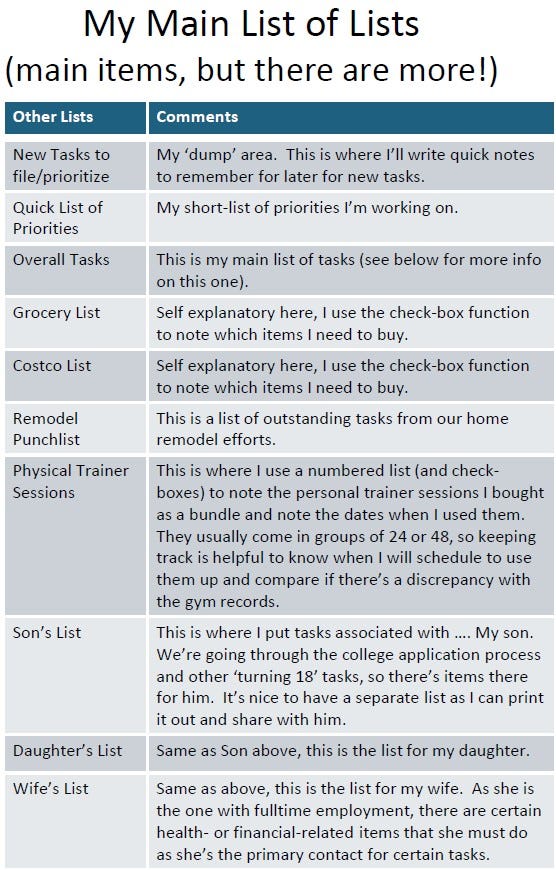
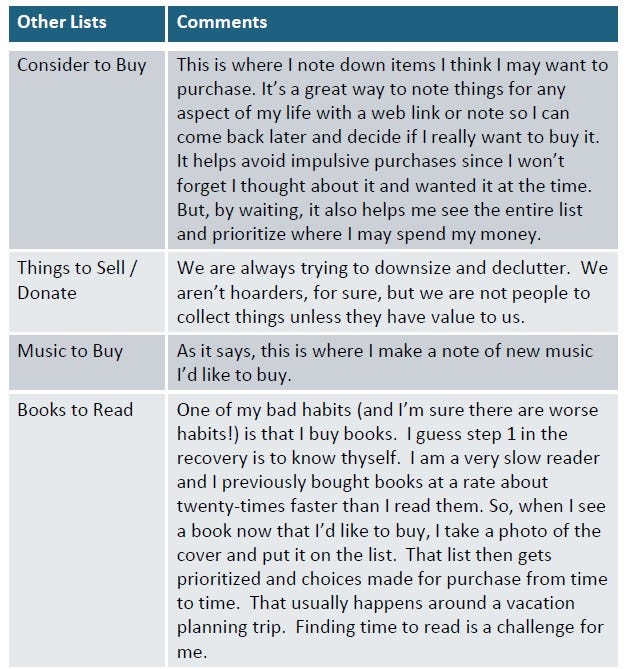
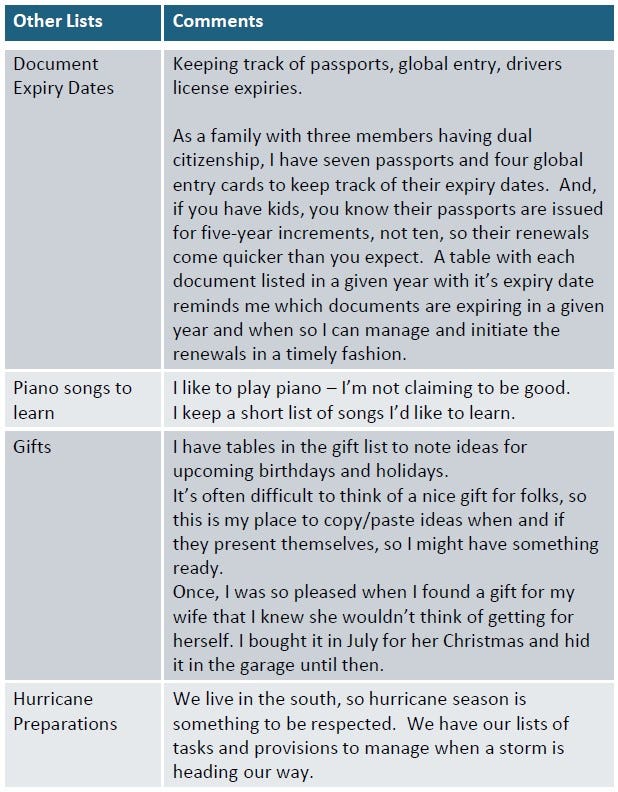
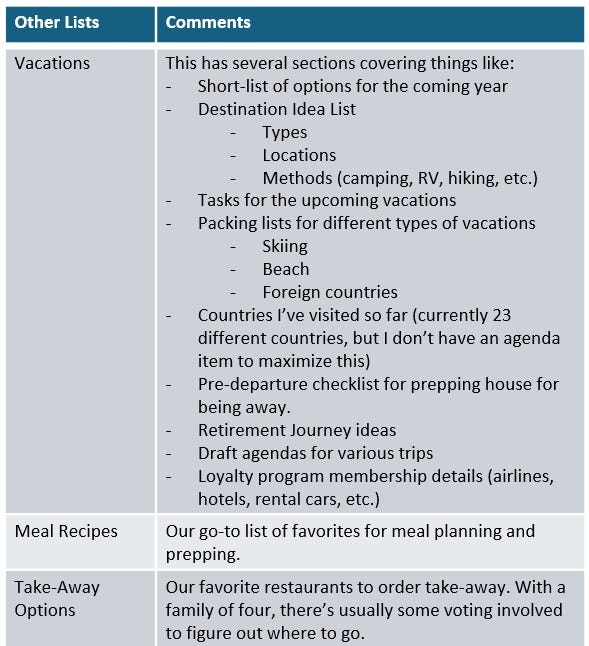
Side note: I used Microsoft Powerpoint to make the colored tables to get the info as concise as possible. If anyone knows of a easy trick to get concise tables into a Medium article, please comment to the article! I’d love to know a better way.
From above, you may think that’s the big list, but please read on! The main list is coming up!
Overall Tasks
Believe it or not, this ‘overall tasks’ list is my main list of tasks. It’s where I put things I think I want or should do. At the top of this sheet, I have a three reminders to keep me grounded:
The first reminder is a note that says:
Strive for “Good Enough and Done” versus “Perfection and Never Done”
The second reminder is a note that says:
“Don’t Wait to Do Something”
(from Texas A&M golfer Sam Bennett’s Dad, June-2020. Here’s a CNN article about Sam & his dad, if you’ve not heard of them.)
The final reminder is the Eisenhower Box:
I use the box to coach myself on priorities and need to do the tasks.
If you’re not familiar with it, here’s an example of the Eisenhower Box:
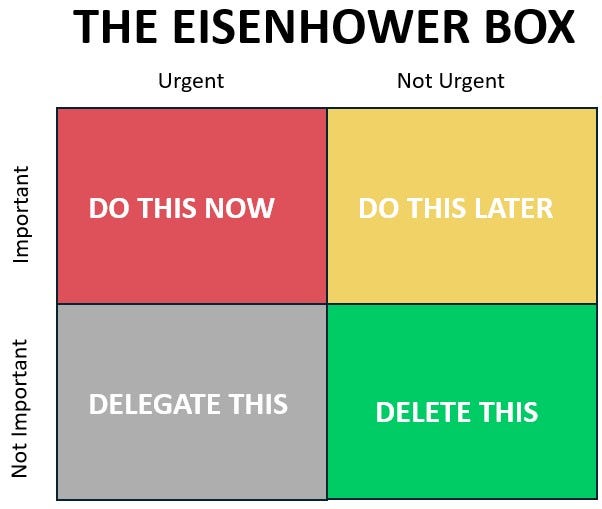
As I’m a team of one, delegation rarely comes up, but sometimes I get family help on some items. But, for the most part, these are tasks that are on me to do.
This sheet has separate tables with headers for the following categories:
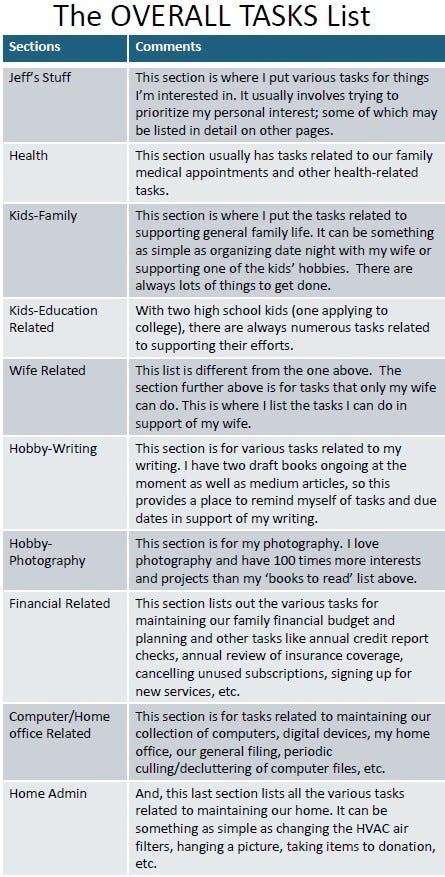
Each of these sections has a table with three columns to make use of the paper space. Here’s sample (blurred for privacy):
Takeaways
And, the above doesn’t cover all of my lists, but you get the picture!
Using lists keeps me organized and helps me not dwell on all the loose ends I want to address while also helping remind me of the key priorities. Given each of us only gets some much time during our week to address our personal tasks and obligations, it’s a great way to stay organized.
Pro Tip #1: choose a focused list of tasks for a given time period. Adding more than three or five will end up diluting your time and efforts to work them to completion. I usually choose two priority items and two ‘low-hanging fruit’ easy items. I like finishing the priorities while also closing out the easy stuff (as filler tasks).
Pro Tip #2: Don’t be afraid to let some things go or take a break from your list. A list is a way to not forget things. Don’t let it stress you out or control your time. When our son was born, I just put it aside for at least nine to twelve months; the world didn’t fall apart. Don’t forget to live your life!
This may all seem silly or that I have some sort of disorder, but it sure helps keep me let go of thinking about all the other stuff too. If it falls in the Delete This box of the Eisenhower box, I may never get to it – And that’s okay too.
Final Thoughts
For me and my family, keeping a list of things we want to do enables us to plan and makes the most of our time. I’m not trying to pat myself on the back, but my wife has said on a few occasions that the organization I do for our family enables us to do so much more than if we left it until Friday evening and said “What do you want to do this weekend?”
I hope you are able to make the most of your time; it’s the one thing we all only get so much of and you can’t buy more.
Enjoy Life and Thanks for Reading,
-Jeff
Oh, and in case you’re wondering about the ‘Non-Bucket list’ reference in the title, I don’t need a bucket list as I have my lists of lists — and I’m always adding, updating and removing items. If it’s worth doing, it’s on the list and I’ll figure out when or if I’ll get to it.